
관리 메뉴

근묵자흑
Kubernetes 모니터링 본문
1. 모니터링 기본 구조
클라우드 네이티브 환경에서의 모니터링
쿠버네티스 환경에서 효과적인 모니터링은 단순한 리소스 추적을 넘어 시스템의 건강도와 성능을 종합적으로 이해하는 과정입니다. **모니터링(Monitoring)**과 **관찰가능성(Observability)**은 서로 보완적인 개념으로, 현대 클라우드 네이티브 환경에서 필수적입니다.
관찰가능성의 3가지 기둥:
- 메트릭(Metrics): 시간에 따른 수치적 측정값
- 로그(Logs): 시스템과 애플리케이션의 이벤트 기록
- 트레이스(Traces): 분산 시스템을 통과하는 요청의 경로
Push vs Pull 아키텍처
Pull 기반 모니터링 (Prometheus 방식):
# Prometheus가 타겟에서 메트릭을 수집
scrape_configs:
  - job_name: 'kubernetes-pods'
    kubernetes_sd_configs:
    - role: pod
    scrape_interval: 30s
장점:
- 중앙화된 제어
- 서비스 디스커버리 자동화
- 타겟 상태 자동 추적 (up 메트릭)
Push 기반 모니터링:
- 애플리케이션이 능동적으로 메트릭 전송
- 배치 작업이나 단기 실행 작업에 적합
- Pushgateway 사용
쿠버네티스 모니터링 아키텍처 패턴
┌─────────────────────────────────────────┐
│           Application Layer             │ ← 비즈니스 메트릭, 커스텀 메트릭
├─────────────────────────────────────────┤
│           Platform Layer (K8s)          │ ← Pod, Service, Deployment 메트릭
├─────────────────────────────────────────┤
│           Infrastructure Layer          │ ← Node, CPU, Memory, Network
└─────────────────────────────────────────┘
2. 모니터링 메트릭의 분류
RED 방법론 (Rate, Errors, Duration)
마이크로서비스 모니터링에 특화된 접근법입니다:
# Rate: 초당 요청 수
rate(http_requests_total[5m])

# Errors: 오류율
rate(http_requests_total{status=~"5.."}[5m]) / rate(http_requests_total[5m])

# Duration: 95% 지연 시간
histogram_quantile(0.95, rate(http_request_duration_seconds_bucket[5m]))
USE 방법론 (Utilization, Saturation, Errors)
시스템 리소스 모니터링을 위한 방법론:
# Utilization: CPU 사용률
100 - (avg(irate(node_cpu_seconds_total{mode="idle"}[5m])) * 100)

# Saturation: 메모리 압박
node_memory_MemAvailable_bytes / node_memory_MemTotal_bytes

# Errors: 디스크 오류
rate(node_disk_io_time_weighted_seconds_total[5m])
4가지 황금 신호 (Four Golden Signals)
Google SRE에서 제안한 핵심 지표:
- Latency: 요청 처리 시간
- Traffic: 시스템 부하
- Errors: 실패율
- Saturation: 리소스 포화도
Prometheus 메트릭 타입
# Counter: 단조 증가하는 누적값
http_requests_total{method="GET", handler="/api/users"}

# Gauge: 증감 가능한 순간값
memory_usage_bytes

# Histogram: 값의 분포
http_request_duration_seconds_bucket{le="0.5"}

# Summary: 클라이언트 계산 백분위수
api_request_duration_seconds{quantile="0.95"}
3. 쿠버네티스 모니터링 기초
3.1 metrics-server
metrics-server는 쿠버네티스 클러스터의 리소스 메트릭을 수집하는 확장 가능한 애드온입니다. HPA(Horizontal Pod Autoscaler)와 VPA(Vertical Pod Autoscaler)를 위한 핵심 구성요소입니다.
주요 특징:
- 15초마다 메트릭 수집
- 노드당 1밀리코어 CPU + 2MB 메모리 사용
- 최대 5,000개 노드 지원
- 인메모리 저장 (최신 값만 유지)
설치 방법:
# 최신 버전 설치
kubectl apply -f https://github.com/kubernetes-sigs/metrics-server/releases/latest/download/components.yaml

# Helm 설치
helm repo add metrics-server https://kubernetes-sigs.github.io/metrics-server/
helm install metrics-server metrics-server/metrics-server \
  --set args[0]=--kubelet-preferred-address-types=InternalIP \
  --set args[1]=--metric-resolution=15s
HPA 설정 예시:
apiVersion: autoscaling/v2
kind: HorizontalPodAutoscaler
metadata:
  name: app-hpa
spec:
  scaleTargetRef:
    apiVersion: apps/v1
    kind: Deployment
    name: app-deployment
  minReplicas: 2
  maxReplicas: 10
  metrics:
  - type: Resource
    resource:
      name: cpu
      target:
        type: Utilization
        averageUtilization: 70
  - type: Resource
    resource:
      name: memory
      target:
        type: AverageValue
        averageValue: "200Mi"
3.2 metrics-server 동작 원리
데이터 수집 플로우:
1. metrics-server → kubelet API 호출 (/metrics/resource)
2. kubelet → cAdvisor를 통해 컨테이너 메트릭 수집
3. Container runtime → cgroups에서 실제 리소스 사용량 획득
4. kubelet → JSON 형태로 메트릭 응답
5. metrics-server → 데이터 집계 및 인메모리 캐시
Metrics API 구조:
apiVersion: metrics.k8s.io/v1beta1
kind: PodMetrics
metadata:
  name: example-pod
  namespace: default
timestamp: "2024-01-01T00:00:00Z"
window: "30s"
containers:
- name: container-1
  usage:
    cpu: "100m"
    memory: "128Mi"
문제 해결:
# metrics-server 로그 확인
kubectl logs -n kube-system deployment/metrics-server

# API 서비스 상태 확인
kubectl get apiservice v1beta1.metrics.k8s.io

# 메트릭 조회 테스트
kubectl get --raw "/apis/metrics.k8s.io/v1beta1/nodes" | jq .
3.3 kube-state-metrics
kube-state-metrics는 Kubernetes API 서버를 감시하여 클러스터 내 객체의 상태 메트릭을 생성합니다.
metrics-server와의 차이점:
구분 kube-state-metrics metrics-server
| 목적 | Kubernetes 객체 상태 | 리소스 사용량 |
| 데이터 소스 | Kubernetes API | kubelet/cAdvisor |
| 사용 사례 | 모니터링, 알람 | HPA, VPA |
배포 방법:
apiVersion: apps/v1
kind: Deployment
metadata:
  name: kube-state-metrics
  namespace: kube-system
spec:
  replicas: 1
  selector:
    matchLabels:
      app.kubernetes.io/name: kube-state-metrics
  template:
    spec:
      serviceAccountName: kube-state-metrics
      containers:
      - image: registry.k8s.io/kube-state-metrics/kube-state-metrics:v2.15.0
        name: kube-state-metrics
        ports:
        - containerPort: 8080
          name: http-metrics
        resources:
          limits:
            cpu: 100m
            memory: 150Mi
          requests:
            cpu: 100m
            memory: 150Mi
주요 메트릭 예시:
# Pod 상태 모니터링
kube_pod_status_phase{phase="Running"}

# Deployment 복제본 확인
kube_deployment_status_replicas_available != kube_deployment_spec_replicas

# 노드 상태
kube_node_status_condition{condition="Ready", status="true"}
3.4 node-exporter
node-exporter는 하드웨어 및 OS 수준 메트릭을 수집하는 Prometheus 익스포터입니다.
DaemonSet 배포:
apiVersion: apps/v1
kind: DaemonSet
metadata:
  name: node-exporter
  namespace: monitoring
spec:
  selector:
    matchLabels:
      app.kubernetes.io/name: node-exporter
  template:
    spec:
      hostNetwork: true
      hostPID: true
      containers:
      - name: node-exporter
        image: quay.io/prometheus/node-exporter:v1.9.1
        args:
          - --path.sysfs=/host/sys
          - --path.rootfs=/host/root
          - --path.procfs=/host/proc
          - --collector.filesystem.mount-points-exclude=^/(dev|proc|sys|var/lib/docker/.+)($|/)
        resources:
          limits:
            cpu: 200m
            memory: 50Mi
          requests:
            cpu: 100m
            memory: 30Mi
        volumeMounts:
        - mountPath: /host/root
          name: root
          readOnly: true
        - mountPath: /host/sys
          name: sys
          readOnly: true
        - mountPath: /host/proc
          name: proc
          readOnly: true
      volumes:
      - hostPath:
          path: /
        name: root
      - hostPath:
          path: /sys
        name: sys
      - hostPath:
          path: /proc
        name: proc
      tolerations:
      - operator: Exists
주요 메트릭:
# CPU 사용률
100 - (avg by (instance) (irate(node_cpu_seconds_total{mode="idle"}[5m])) * 100)

# 메모리 사용률
(1 - (node_memory_MemAvailable_bytes / node_memory_MemTotal_bytes)) * 100

# 디스크 사용률
100 - ((node_filesystem_avail_bytes{mountpoint="/"} * 100) / node_filesystem_size_bytes{mountpoint="/"})
4. Elasticsearch & Kibana & APM 연동
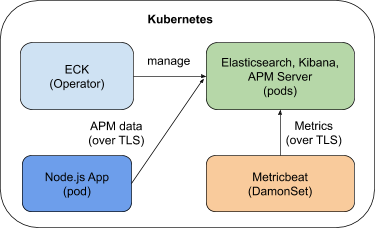
- Elasticsearch & Kibana

- Elasticsearch APM
'k8s' 카테고리의 다른 글
| DefaultBuildHandlerChain 깊게 파헤치기 (2) | 2025.07.10 |
|---|---|
| Kubernetes API Server : 코드 레벨에서 이해하는 내부 동작 원리 (0) | 2025.07.03 |
| 쿠버네티스 파드를 사용하는 주요 오브젝트들 (2) | 2025.06.15 |
| 커스텀 리소스와 컨트롤러 - CR & CRD (1) | 2025.06.08 |
| Kubernetes Admission Controller (1) | 2025.06.01 |